Documentation
Concepts
Dashboard

API Documentation

Complete reference for Mnexium's HTTP APIs. Build AI applications with persistent memory, conversation history, user profiles, and agent state — across OpenAI, Anthropic, and Google models.

Concepts & Architecture

Before diving into the API, it helps to understand the core concepts that power Mnexium's memory system.
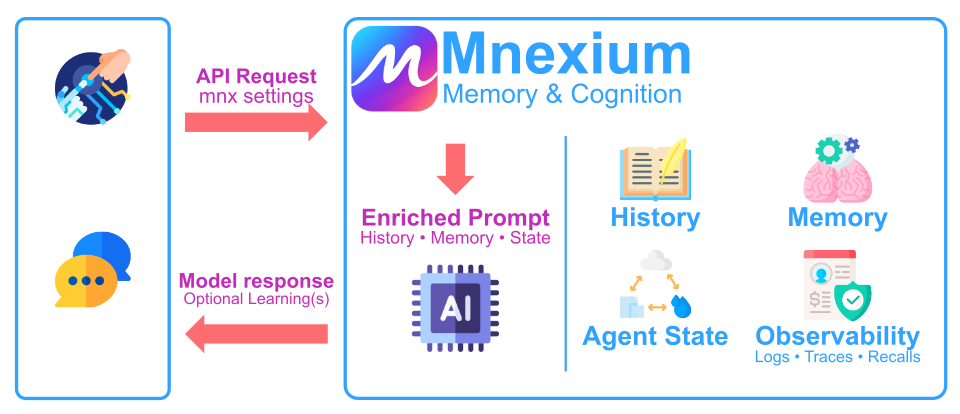
Mnexium Architecture Diagram

Your agent sends a normal API request to Mnexium, along with a few mnx options. Mnexium automatically retrieves conversation history, relevant long-term memory, agent state, and relevant records — and builds an enriched prompt for the model.

The model returns a response, and Mnexium optionally learns from the interaction (memory extraction and structured record extraction). Every step is visible through logs, traces, and recall events so you can debug exactly what happened.

Who This Is For

Use Mnexium if you're building AI assistants or agents that must remember users across sessions, resume multi-step tasks, and stay configurable per project, user, or conversation. Mnexium combines long-term memories, structured records, and short-term state so your application can handle both personalized context and deterministic data workflows without custom orchestration.

Works with developers using ChatGPT (OpenAI), Claude (Anthropic), and Gemini (Google) — bring your own API key and Mnexium handles routing, context assembly, and optional learning. Memories and records are accessible across providers when you keep the same subject_id.

Chat History, Memory, State & Records

Four distinct but complementary systems for context management:

Chat History

The raw conversation log — every message sent and received within a chat_id. Used for context continuity within a single conversation session. Think of it as short-term, session-scoped memory.

Enabled with history: true

Agent Memory

Extracted facts, preferences, and context about a subject_id (user). Persists across all conversations and sessions. Think of it as long-term, user-scoped memory that the agent "remembers" about someone.

Created with learn: true, recalled with recall: true

Agent State

Short-term, task-scoped working context for agentic workflows. Tracks task progress, pending actions, and session variables. Think of it as the agent's "scratchpad" for multi-step tasks.

Stored with PUT /state/:key, loaded with state.load: true

Records

Schema-backed structured entities (for example accounts, deals, tickets, tasks). Records are optimized for deterministic retrieval and updates, complementing unstructured memory recall.

Recalled with records.recall: true, extracted with records.learn: "auto" or "force"

Message Assembly Order

For chat completions, Mnexium assembles the final messages array in this order:

1Resolved System Prompt — Project → subject → chat scoped prompt (if system_prompt is not false)
2Agent State — Current task context as JSON (if state.load: true)
3Memories — Relevant facts about the user (if recall: true)
4Records — Relevant structured entities from selected schemas (if records.recall: true)
5Chat History — Previous messages from this conversation (if history: true)
6User Messages — The messages you provide in the request

Items 1-4 are appended to the system message. Item 5 is prepended to the messages array. Item 6 is your original request.

Memory Fields

Each memory has metadata that helps with organization, recall, and lifecycle management:

status
string
active (current, will be recalled) or superseded (replaced by newer memory, won't be recalled)
kind
string
Category: fact, preference, context, or note
importance
number
0-100 score affecting recall priority. Higher = more likely to be included in context.
visibility
string
private (subject only), shared (project-wide), or public
seen_count
number
How many times this memory has been recalled in conversations.
last_seen_at
timestamp
When this memory was last recalled.
superseded_by
string
If superseded, the ID of the memory that replaced this one.

Memory Versioning

When new memories are created, the system automatically handles conflicts using semantic similarity. There are only two status values: active and superseded.

Skip
If a new memory is very similar to an existing one (same meaning), the new memory is not created to avoid redundancy.

Example: "User likes coffee" → "User enjoys coffee" (new one skipped)

Supersede
If a new memory conflicts with an existing one (same topic, different value), the old memory's status changes to superseded and the new one is created as active.

Example: "Favorite fruit is blueberry" → "Favorite fruit is apple" (old becomes superseded)

Create
If the memory is about a different topic, it's stored as a new active memory.

Example: "User likes coffee" + "User works remotely" (both remain active)

Superseded memories are preserved for audit purposes and can be restored via the POST /memories/:id/restore endpoint. To disable conflict detection entirely (e.g. for bulk imports), pass no_supersede: true when creating memories.

Memory Decay & Reinforcement

Memories naturally decay over time, similar to human memory. Frequently recalled memories become stronger, while unused memories gradually fade in relevance. This ensures the most important and actively-used information surfaces during recall.

Confidence
How certain the AI was when extracting this memory. Higher confidence memories are prioritized during recall.
Reinforcement
Each time a memory is recalled, it gets reinforced — strengthening its relevance and resetting its decay timer.
Temporal
Some memories are time-sensitive (e.g., "User is traveling next week"). These decay faster than permanent facts.
Source
Memories can be explicit (created via API), inferred (extracted from conversation), or corrected (user corrected an inference).

The Memory Lifecycle

1Extract — LLM analyzes conversation and identifies memorable facts (learn: true). Extraction runs asynchronously — it never blocks the response.
2Store — Memory is saved with embedding for semantic search
3Recall — Relevant memories are injected into future conversations (recall: true)
4Reinforce — Recalled memories get stronger; unused memories naturally decay
5Evolve — Conflicting memories supersede old ones; duplicates are skipped
Getting Started

Mnexium provides a proxy layer for OpenAI APIs with built-in support for conversation persistence, memory management, and system prompt injection. Use the HTTP API directly with cURL, or install an official SDK.

Installation

Node.js / TypeScript
npm
bash
npm install @mnexium/sdk
Python
PyPI
bash
pip install mnexium

No SDK required — you can also call the API directly with cURL or any HTTP client. Use the language switcher above to see examples in your preferred language.

Quick Example

A request to the Chat Completions API with history, memory extraction, and all Mnexium features enabled:

bash
curl -X POST "https://www.mnexium.com/api/v1/chat/completions" \  -H "x-mnexium-key: $MNX_KEY" \  -H "Content-Type: application/json" \  -H "x-openai-key: $OPENAI_KEY" \  -d '{    "model": "gpt-4o-mini",    "messages": [{ "role": "user", "content": "What IDE should I use?" }],    "mnx": {      "subject_id": "user_123",      "chat_id": "550e8400-e29b-41d4-a716-446655440000",      "log": true,      "learn": true,      "recall": true,      "history": true    }  }'

What happens:

  • log: true — Saves this conversation turn to chat history
  • learn: true — LLM analyzes the message and may extract memories (runs asynchronously after the response)
  • recall: true — Injects relevant stored memories into context (e.g., "User prefers dark mode", "User is learning Rust")
  • history: true — Prepends previous messages from this chat_id for context
  • memory_policy — Optional extraction policy override (explicit ID, false to disable, or omitted for scoped defaults)

Use learn: "force" to always create a memory, or learn: false to skip memory extraction entirely.

Get Started Repository

Clone our starter repo for working examples in Node.js and Python:

github.com/mariusndini/mnexium-get-started
SDK Integration

Choose Your Integration Style

Mnexium supports two integration approaches. Choose based on your needs:

OpenAI Connector (Recommended)

Use the OpenAI SDK for all providers (OpenAI, Claude, Gemini). Same code, same response format, just change the model name.

  • Unified API across all providers
  • Full mnx support in request body
  • Consistent response format
  • Lowest integration complexity

Native SDKs

Use each provider's official SDK with their native endpoints and response formats.

  • Native SDK features and types
  • Provider-specific response formats
  • mnx via headers (SDKs strip body params)
  • Different base URLs per provider

Code Examples

Use the OpenAI SDK to call any provider through Mnexium's unified endpoint. Just change the model name and pass the appropriate provider key.

ProviderHeaderExample Models
OpenAIx-openai-keygpt-4o, gpt-4o-mini
Anthropicx-anthropic-keyclaude-sonnet-4-20250514
Googlex-google-keygemini-2.0-flash-lite
js
import OpenAI from "openai";

const BASE_URL = "https://mnexium.com/api/v1";

// OpenAI client
const openai = new OpenAI({
  baseURL: BASE_URL,
  defaultHeaders: {
    "x-mnexium-key": process.env.MNX_KEY,
    "x-openai-key": process.env.OPENAI_API_KEY,
  },
});

// Claude client (via OpenAI SDK)
const claude = new OpenAI({
  baseURL: BASE_URL,
  defaultHeaders: {
    "x-mnexium-key": process.env.MNX_KEY,
    "x-anthropic-key": process.env.CLAUDE_API_KEY,
  },
});

// Gemini client (via OpenAI SDK)
const gemini = new OpenAI({
  baseURL: BASE_URL,
  defaultHeaders: {
    "x-mnexium-key": process.env.MNX_KEY,
    "x-google-key": process.env.GEMINI_KEY,
  },
});

// All calls use the same API!
const openaiResponse = await openai.chat.completions.create({
  model: "gpt-4o",
  messages: [{ role: "user", content: "What do you know about me?" }],
  mnx: { subject_id: "user_123", recall: true },
});

const claudeResponse = await claude.chat.completions.create({
  model: "claude-sonnet-4-20250514",
  messages: [{ role: "user", content: "What do you know about me?" }],
  mnx: { subject_id: "user_123", recall: true },
});

const geminiResponse = await gemini.chat.completions.create({
  model: "gemini-2.0-flash-lite",
  messages: [{ role: "user", content: "What do you know about me?" }],
  mnx: { subject_id: "user_123", recall: true },
});

Cross-Provider Memory Sharing

Memories learned with one provider are automatically available to all others. Use the same subject_id across providers to share context.

js
// Learn a fact with OpenAI
await openai.chat.completions.create({
  model: "gpt-4o-mini",
  messages: [{ role: "user", content: "My favorite color is purple" }],
  mnx: { subject_id: "user_123", learn: "force" },
});

// Recall with Claude - it knows the color!
const claudeResponse = await claude.chat.completions.create({
  model: "claude-sonnet-4-20250514",
  messages: [{ role: "user", content: "What is my favorite color?" }],
  mnx: { subject_id: "user_123", recall: true },
});
// Claude responds: "Your favorite color is purple!"

This enables multi-model workflows where each task can use the most appropriate model while keeping user context consistent.

Trial Keys

Auto-Provisioned Trial Keys

Mnexium automatically provisions trial API keys for anonymous users. When you make a request without an x-mnexium-key header, we create a trial key based on your device fingerprint (IP + User-Agent).

How it works
  • First request without a key → new trial key created
  • Same device, no key → same trial key reused (no key returned)
  • Different device → different trial key
  • Trial keys have no expiry — they work until claimed or revoked

Response with Provisioned Key

When a new trial key is provisioned, it's returned in both the response headers and body:

// Response Headers
X-Mnx-Key-Provisioned: mnx_trial.abc123...
X-Mnx-Claim-Url: https://mnexium.com/claim

// Response Body
{
  "choices": [...],
  "mnx": {
    "chat_id": "...",
    "subject_id": "...",
    "provisioned_key": "mnx_trial.abc123...",
    "claim_url": "https://mnexium.com/claim"
  }
}
Important: save your key

The full trial key is only returned once when first provisioned. Save it immediately — subsequent requests from the same device won't return the key again.

Key Recovery with regenerate_key

If a trial key is unavailable, use regenerate_key: true to issue a replacement key. The previous key is revoked while project data is preserved.

js
const response = await fetch("https://mnexium.com/api/v1/chat/completions", {
  method: "POST",
  headers: {
    "Content-Type": "application/json",
    "x-openai-key": "sk-..."
    // No x-mnexium-key
  },
  body: JSON.stringify({
    model: "gpt-4o-mini",
    messages: [{ role: "user", content: "Remember that I prefer dark mode" }],
    mnx: {
      regenerate_key: true  // Forces new key
    }
  })
});

// Response includes new key in headers + body

Claiming Your Trial Key

Convert your trial key to a full account to access the dashboard, create more keys, and manage your data.

2Paste your trial key (e.g., mnx_trial.abc123...)
3Sign in or create an account
4Click "Claim This Key" — your key and project are now linked to your account
✓ Data preserved

All memories, chats, and profiles created during your trial are transferred to your account.

Trial Key Limits

Trial keys have the same usage limits as regular keys. Usage is tracked per fingerprint.

API calls
limit
Up to 10,000 per month
Memory actions
limit
Up to 1,000 per month
Expiry
none
Trial keys do not expire
Scopes
full
Full access (*)
Authentication

API Keys

All requests require a Mnexium API key. You can pass it via x-mnexium-key (recommended) or Authorization header.

x-mnexium-keyrequired
header
mnx_live_... — Your Mnexium API key (recommended for SDK users)
Authorization
header
Bearer mnx_live_... — Alternative: Mnexium key via Authorization header
x-openai-key
header
sk-... — Your OpenAI API key (required for OpenAI models)
x-anthropic-key
header
sk-ant-... — Your Anthropic API key (required for Claude models)
x-google-key
header
AI... — Your Google API key (required for Gemini models)

SDK users: Use x-mnexium-key so the SDK's apiKey can be used for your provider key (OpenAI, Anthropic, Google). If you override Authorization with your Mnexium key, you must explicitly pass the provider key via x-openai-key, x-anthropic-key, or x-google-key.

API Key Permissions

API keys can be scoped to limit access. Available scopes:

ScopeGETPOST/PATCHDELETE
read
write
delete
*
The mnx Object

Include the mnx object in your request body to control Mnexium features:

subject_id
string
Identifies the end-user. Auto-generated with subj_ prefix if omitted.
chat_id
string
Conversation identifier (UUID). Auto-generated if omitted.
log
boolean
Save messages to chat history. Default: true
learn
boolean | 'force'
Memory extraction: true (LLM decides), "force" (always), false (never). Default: true
recall
boolean
Inject relevant stored memories into context. Searches memories for this subject and adds matching ones to the system prompt. Default: false
history
boolean
Prepend previous messages from this chat. Default: true
summarize
boolean | string
Enable conversation summarization to reduce token costs. Use preset modes: "light", "balanced", or "aggressive". Default: false
system_prompt
boolean | string
true (auto-resolve, default), false (skip injection), or a prompt ID like "sp_abc" for explicit selection.
memory_policy
boolean | string
true / omitted (auto-resolve default policy by scope), false (disable memory policy), or a policy ID like "mem_pol_abc" for explicit selection.
metadata
object
Custom metadata attached to saved logs.
Responses API
POST/api/v1/responses

Proxy for OpenAI and Anthropic APIs with Mnexium extensions for history, persistence, and system prompts. Supports GPT-4, Claude, and other models.

Scope:responses:write
Request
bash
curl -X POST "https://www.mnexium.com/api/v1/responses" \
  -H "x-mnexium-key: $MNX_KEY" \
  -H "Content-Type: application/json" \
  -H "x-openai-key: $OPENAI_KEY" \
  -d '{
    "model": "gpt-4o-mini",
    "input": "What are some project ideas based on my interests?",
    "mnx": {
      "subject_id": "user_123",
      "chat_id": "550e8400-e29b-41d4-a716-446655440000",
      "log": true,
      "learn": true,
      "recall": true
    }
  }'
mnx Parameters
subject_id
string
User/subject identifier for memory and history.
chat_id
string
Conversation ID (UUID recommended) for history grouping.
log
boolean
Save to chat history. Default: true
learn
boolean | 'force'
Memory extraction: false (never), true (LLM decides), "force" (always). Default: true
history
boolean
Prepend chat history. Default: false
system_prompt
string | boolean
Prompt ID, true (auto-resolve), or false (skip). Default: true
memory_policy
string | boolean
Memory policy ID, false (skip), or omitted/true (auto-resolve). Default: true
Response
json
{
  "id": "resp_abc123",
  "object": "response",
  "created_at": 1702847400,
  "output": [
    {
      "type": "message",
      "role": "assistant",
      "content": [
        { "type": "output_text", "text": "Based on your interests in Rust and Python, here are some project ideas..." }
      ]
    }
  ],
  "usage": { "input_tokens": 12, "output_tokens": 45 }
}
Response headers include X-Mnx-Chat-Id and X-Mnx-Subject-Id
Show Claude (Anthropic) example

Use x-anthropic-key header and a Claude model name.

Request
bash
curl -X POST "https://www.mnexium.com/api/v1/responses" \
  -H "x-mnexium-key: $MNX_KEY" \
  -H "Content-Type: application/json" \
  -H "x-anthropic-key: $ANTHROPIC_KEY" \
  -d '{
    "model": "claude-sonnet-4-20250514",
    "input": "What programming language did I say I was learning?",
    "mnx": {
      "subject_id": "user_123",
      "recall": true
    }
  }'
Show streaming example

Set "stream": true to receive Server-Sent Events (SSE).

Request
bash
curl -X POST "https://www.mnexium.com/api/v1/responses" \
  -H "x-mnexium-key: $MNX_KEY" \
  -H "Content-Type: application/json" \
  -H "x-openai-key: $OPENAI_KEY" \
  -d '{ "model": "gpt-4o-mini", "input": "What do you remember about me?", "mnx": { "subject_id": "user_123", "recall": true }, "stream": true }'
Response (SSE)
data: {"type":"response.output_text.delta","delta":"Based"}
data: {"type":"response.output_text.delta","delta":" on"}
data: {"type":"response.output_text.delta","delta":" our"}
data: {"type":"response.output_text.delta","delta":" previous"}
data: {"type":"response.output_text.delta","delta":" conversations,"}
data: {"type":"response.output_text.delta","delta":" I know you..."}
data: {"type":"response.completed","response":{...}}
data: [DONE]

Parse each data: line as JSON. Collect delta values to build the full response.

Chat Completions
POST/api/v1/chat/completions

Proxy for OpenAI and Anthropic Chat APIs with automatic history prepending and system prompt injection. Supports GPT-4, Claude, and other models.

Scope:chat:write
Request
bash
curl -X POST "https://www.mnexium.com/api/v1/chat/completions" \
  -H "x-mnexium-key: $MNX_KEY" \
  -H "Content-Type: application/json" \
  -H "x-openai-key: $OPENAI_KEY" \
  -d '{
    "model": "gpt-4o-mini",
    "messages": [
      { "role": "user", "content": "I just switched to VS Code. Can you update my setup recommendations?" }
    ],
    "mnx": {
      "subject_id": "user_123",
      "chat_id": "550e8400-e29b-41d4-a716-446655440000",
      "log": true,
      "learn": true,
      "recall": true,
      "history": true
    }
  }'
mnx Parameters
subject_id
string
User/subject identifier for memory and history.
chat_id
string
Conversation ID (UUID recommended) for history grouping.
log
boolean
Save to chat history. Default: true
learn
boolean | 'force'
Memory extraction: false (never), true (LLM decides), "force" (always). Default: true
history
boolean
Prepend chat history. Default: true
system_prompt
string | boolean
Prompt ID, true (auto-resolve), or false (skip). Default: true
memory_policy
string | boolean
Memory policy ID, false (skip), or omitted/true (auto-resolve). Default: true
Response
json
{
  "id": "chatcmpl-abc123",
  "object": "chat.completion",
  "created": 1702847400,
  "model": "gpt-4o-mini",
  "choices": [
    {
      "index": 0,
      "message": {
        "role": "assistant",
        "content": "Great choice! Since you work with Rust and Python, I'd recommend installing rust-analyzer and...",
      },
      "finish_reason": "stop"
    }
  ],
  "usage": { "prompt_tokens": 10, "completion_tokens": 12, "total_tokens": 22 }
}
Response headers include X-Mnx-Chat-Id and X-Mnx-Subject-Id
Show streaming example

Set "stream": true to receive Server-Sent Events (SSE).

Request
bash
curl -X POST "https://www.mnexium.com/api/v1/chat/completions" \
  -H "x-mnexium-key: $MNX_KEY" \
  -H "Content-Type: application/json" \
  -H "x-openai-key: $OPENAI_KEY" \
  -d '{ "model": "gpt-4o-mini", "messages": [{"role":"user","content":"What were we discussing last time?"}], "mnx": { "subject_id": "user_123", "history": true }, "stream": true }'
Response (SSE)
data: {"choices":[{"delta":{"role":"assistant"},"index":0}]}
data: {"choices":[{"delta":{"content":"Last"},"index":0}]}
data: {"choices":[{"delta":{"content":" time"},"index":0}]}
data: {"choices":[{"delta":{"content":" we"},"index":0}]}
data: {"choices":[{"delta":{"content":" talked"},"index":0}]}
data: {"choices":[{"delta":{"content":" about"},"index":0}]}
data: {"choices":[{"delta":{"content":" your Rust project..."},"index":0}]}
data: {"choices":[{"delta":{},"finish_reason":"stop","index":0}]}
data: [DONE]

Parse each data: line as JSON. Concatenate delta.content values to build the response.

Chat History
GETlistGETreadDELETEdelete
GET/api/v1/chat/history/list

List all chats for a subject. Returns chat summaries with message counts — useful for building chat sidebars.

Scope:history:read
subject_idrequired
string
The subject to list chats for.
limit
number
Max chats to return. Default: 50, Max: 500
Request
bash
curl -G "https://www.mnexium.com/api/v1/chat/history/list" \
  -H "x-mnexium-key: $MNX_KEY" \
  --data-urlencode "subject_id=user_123" \
  --data-urlencode "limit=50"
Response
json
{
  "chats": [
    {
      "subject_id": "user_123",
      "chat_id": "550e8400-e29b-41d4-a716-446655440000",
      "last_time": "2024-12-17T19:00:01Z",
      "message_count": 12
    },
    {
      "subject_id": "user_123",
      "chat_id": "660e8400-e29b-41d4-a716-446655440001",
      "last_time": "2024-12-16T14:30:00Z",
      "message_count": 8
    }
  ]
}
GET/api/v1/chat/history/read

Retrieve message history for a specific conversation. Use after listing chats to load full messages.

Scope:history:read
chat_idrequired
string
The conversation ID to fetch history for.
subject_id
string
Filter by subject (optional).
limit
number
Max messages to return. Default: 200
Request
bash
curl -G "https://www.mnexium.com/api/v1/chat/history/read" \
  -H "x-mnexium-key: $MNX_KEY" \
  --data-urlencode "chat_id=550e8400-e29b-41d4-a716-446655440000" \
  --data-urlencode "subject_id=user_123" \
  --data-urlencode "limit=50"
Response
json
{
  "messages": [
    {
      "role": "user",
      "message": "I just switched to VS Code for my Rust projects.",
      "message_index": 0,
      "event_time": "2024-12-17T19:00:00Z",
      "tool_call_id": "",
      "tool_calls": "",
      "memory_ids": []
    },
    {
      "role": "assistant",
      "message": "Great choice! Since you work with Rust, I'd recommend installing rust-analyzer and...",
      "message_index": 1,
      "event_time": "2024-12-17T19:00:01Z",
      "tool_call_id": "",
      "tool_calls": "",
      "memory_ids": []
    }
  ]
}

memory_ids: IDs of memories that were extracted from this message (when learn: true).

DELETE/api/v1/chat/history/delete

Delete all messages in a chat. This is a soft delete — messages are marked as deleted but retained for audit purposes.

Scope:history:write
chat_idrequired
string
The conversation ID to delete.
subject_id
string
Filter by subject (optional, for additional safety).
Request
bash
curl -X DELETE "https://www.mnexium.com/api/v1/chat/history/delete?chat_id=550e8400-e29b-41d4-a716-446655440000&subject_id=user_123" \
  -H "x-mnexium-key: $MNX_KEY"
Response
json
{
  "success": true,
  "chat_id": "550e8400-e29b-41d4-a716-446655440000"
}
Summarization

Long conversations can exceed context window limits and increase costs. Mnexium's Summarization feature automatically compresses older messages into concise summaries while preserving recent messages verbatim.

When enabled, Mnexium generates rolling summaries of your conversation history. Summaries are cached and reused across requests, so you only pay for summarization once per conversation segment.

Use the summarize parameter in your mnx object to enable automatic summarization. Choose a preset mode based on your cost/fidelity tradeoff:

ModeStart AtKeep RecentSummary TargetBest For
offAllMaximum fidelity (default)
light70K tokens25 msgs~1,800 tokensSafe compression
balanced55K tokens15 msgs~1,100 tokensBest cost/performance
aggressive35K tokens8 msgs~700 tokensCheapest possible
Using a preset mode
json
{
  "model": "gpt-4o-mini",
  "messages": [{ "role": "user", "content": "..." }],
  "mnx": {
    "subject_id": "user_123",
    "chat_id": "550e8400-e29b-41d4-a716-446655440000",
    "summarize": "balanced"
  }
}
Using custom config
json
{
  "model": "gpt-4o-mini",
  "messages": [{ "role": "user", "content": "..." }],
  "mnx": {
    "subject_id": "user_123",
    "chat_id": "550e8400-e29b-41d4-a716-446655440000",
    "summarize_config": {
      "start_at_tokens": 40000,
      "chunk_size": 15000,
      "keep_recent_messages": 10,
      "summary_target": 800
    }
  }
}
start_at_tokens— Token threshold to trigger summarization. History below this is sent verbatim.
chunk_size— How many tokens to summarize at a time when history exceeds threshold.
keep_recent_messages— Always keep this many recent messages verbatim (not summarized).
summary_target— Target token count for each generated summary.
  1. When a chat request comes in, Mnexium counts tokens in the conversation history using tiktoken.
  2. If history exceeds start_at_tokens, older messages are summarized.
  3. The summary is generated using gpt-4o-mini and cached in the database.
  4. Future requests reuse the cached summary until new messages push past the threshold again.
  5. The final context sent to the LLM is: [Summary] + [Recent Messages] + [New Message]

Mnexium uses a rolling summary by default: we maintain a single condensed memory block for older messages and inject that plus the most recent turns into the model.

This is the most token-efficient strategy and is recommended for almost all workloads.

For specialized use cases that need more detailed historical context inside the prompt (at higher token cost), granular summaries can be enabled in a future release, which keep multiple smaller summary blocks instead of one.

Memories
GETmemoriesPOSTmemoriesGET:idGETclaimsPATCH:idDELETE:idGETsearchGETsupersededPOSTrestoreGETrecalls
GET/api/v1/memories

List all memories for a subject. Use this for full memory management.

Scope:memories:read
subject_idrequired
string
The subject to fetch memories for.
limit
number
Max memories to return. Default: 50
offset
number
Pagination offset. Default: 0
Request
bash
curl -G "https://www.mnexium.com/api/v1/memories" \
  -H "x-mnexium-key: $MNX_KEY" \
  --data-urlencode "subject_id=user_123" \
  --data-urlencode "limit=20"
Response
json
{
  "data": [
    {
      "id": "mem_abc123",
      "text": "User prefers dark mode interfaces",
      "kind": "preference",
      "importance": 75,
      "created_at": "2024-12-15T10:30:00Z"
    }
  ],
  "count": 1
}
GET/api/v1/memories/search

Semantic search over a subject's memories. Returns the most relevant items by similarity score.

Scope:memories:search
subject_idrequired
string
The subject to search memories for.
qrequired
string
Search query.
limit
number
Max results. Default: 25
Request
bash
curl -G "https://www.mnexium.com/api/v1/memories/search" \
  -H "x-mnexium-key: $MNX_KEY" \
  --data-urlencode "subject_id=user_123" \
  --data-urlencode "q=food preferences" \
  --data-urlencode "limit=5"
Response
json
{
  "data": [
    {
      "id": "mem_xyz789",
      "text": "User is vegetarian and enjoys Italian cuisine",
      "score": 0.92
    },
    {
      "id": "mem_uvw012",
      "text": "User is allergic to peanuts",
      "score": 0.78
    }
  ],
  "query": "food preferences",
  "count": 2
}
POST/api/v1/memories

Manually create a memory. For automatic extraction with LLM-chosen classification, use the Responses or Chat API with learn: true instead.

Scope:memories:write
Guidance: When you use the Responses or Chat Completions API with learn: true, the LLM automatically extracts memories and intelligently chooses the kind, importance, and tags based on conversation context. Use learn: "force" to always create a memory. This endpoint is for manual injection when you need direct control.
subject_idrequired
string
The subject this memory belongs to.
textrequired
string
The memory content (max 10,000 chars).
kind
string
Optional. Type: fact, preference, context, instruction. Fallback: "fact"
visibility
string
Optional. Visibility: private, shared, public. Fallback: "private"
importance
number
Optional. Priority 0-100. Fallback: 50
tags
array
Optional. Tags for categorization. Fallback: []
metadata
object
Optional. Custom metadata object. Fallback:
no_supersede
boolean
Optional. If true, skip conflict detection and never supersede existing memories. Useful for bulk imports. Fallback: false
Note: When using learn: true with the Responses/Chat API, the LLM intelligently chooses kind, visibility, importance, and tags based on context. The fallback values above only apply when manually creating memories via this endpoint.
Request
bash
curl -X POST "https://www.mnexium.com/api/v1/memories" \
  -H "x-mnexium-key: $MNX_KEY" \
  -H "Content-Type: application/json" \
  -d '{
    "subject_id": "user_123",
    "text": "User prefers dark mode interfaces",
    "kind": "preference",
    "importance": 75,
    "no_supersede": false
  }'
Response
json
{
  "id": "mem_abc123",
  "subject_id": "user_123",
  "text": "User prefers dark mode interfaces",
  "kind": "preference",
  "created": true,
  "superseded_count": 0,
  "superseded_ids": []
}
GET/api/v1/memories/:id

Get a specific memory by ID.

Scope:memories:read
idrequired
path
The memory ID.
Request
bash
curl "https://www.mnexium.com/api/v1/memories/mem_abc123" \
  -H "x-mnexium-key: $MNX_KEY"
Response
json
{
  "data": {
    "id": "mem_abc123",
    "subject_id": "user_123",
    "text": "User prefers dark mode interfaces",
    "kind": "preference",
    "importance": 75,
    "created_at": "2024-12-15T10:30:00Z"
  }
}
GET/api/v1/memories/:id/claims

Get structured claims/assertions extracted from a specific memory.

Scope:memories:read
idrequired
path
The memory ID.
Request
bash
curl "https://www.mnexium.com/api/v1/memories/mem_abc123/claims" \
  -H "x-mnexium-key: $MNX_KEY"
Response
json
{
  "data": [
    {
      "id": "ast_abc123",
      "predicate": "favorite_color",
      "type": "string",
      "value": "yellow",
      "confidence": 0.95,
      "status": "active",
      "first_seen_at": "2024-12-15T10:30:00Z",
      "last_seen_at": "2024-12-15T10:30:00Z"
    }
  ],
  "count": 1
}
PATCH/api/v1/memories/:id

Update an existing memory. Embeddings are regenerated if text changes.

Scope:memories:write
idrequired
path
The memory ID to update.
text
string
New memory content.
kind
string
New type.
importance
number
New importance (0-100).
tags
array
New tags.
Request
bash
curl -X PATCH "https://www.mnexium.com/api/v1/memories/mem_abc123" \
  -H "x-mnexium-key: $MNX_KEY" \
  -H "Content-Type: application/json" \
  -d '{
    "text": "User strongly prefers dark mode",
    "importance": 90
  }'
Response
json
{
  "id": "mem_abc123",
  "updated": true
}
DELETE/api/v1/memories/:id

Soft-delete a memory. The memory is deactivated but retained for audit.

Scope:memories:delete
idrequired
path
The memory ID to delete.
Request
bash
curl -X DELETE "https://www.mnexium.com/api/v1/memories/mem_abc123" \
  -H "x-mnexium-key: $MNX_KEY"
Response
json
{
  "ok": true,
  "deleted": true
}
GET/api/v1/memories/superseded

List memories that have been superseded (replaced by newer memories). Useful for audit and debugging.

Scope:memories:read
subject_idrequired
string
The subject to fetch superseded memories for.
limit
number
Max memories to return. Default: 50
offset
number
Pagination offset. Default: 0
Request
bash
curl -G "https://www.mnexium.com/api/v1/memories/superseded" \
  -H "x-mnexium-key: $MNX_KEY" \
  --data-urlencode "subject_id=user_123"
Response
json
{
  "data": [
    {
      "id": "mem_old123",
      "text": "Favorite fruit is blueberry",
      "status": "superseded",
      "superseded_by": "mem_new456",
      "created_at": "2024-12-10T10:00:00Z"
    }
  ],
  "count": 1
}
POST/api/v1/memories/:id/restore

Restore a superseded memory back to active status. Use this to undo an incorrect supersede.

Scope:memories:write
idrequired
path
The memory ID to restore.
Request
bash
curl -X POST "https://www.mnexium.com/api/v1/memories/mem_old123/restore" \
  -H "x-mnexium-key: $MNX_KEY"
Response
json
{
  "ok": true,
  "restored": true,
  "id": "mem_old123",
  "subject_id": "user_123",
  "text": "Favorite fruit is blueberry"
}

Memory Versioning & Conflict Resolution

Mnexium automatically handles conflicting memories. When a user updates a preference or fact, the system detects semantically similar memories and supersedes them.

Example: If a user has the memory "Favorite fruit is blueberry" and later says "my new favorite fruit is strawberry", the system will:

  1. Extract the new memory: "User's favorite fruit is strawberry"
  2. Detect the old "blueberry" memory as a conflict
  3. Mark the old memory as superseded
  4. Only the new "strawberry" memory will be recalled in future conversations

Memory Status

activeMemory is current and will be included in recall searches.
supersededMemory has been replaced by a newer one. Excluded from recall but retained for audit.

Usage Tracking

When memories are recalled during a chat completion with recall: true, the system automatically tracks:

  • last_seen_at — Timestamp of the most recent recall
  • seen_count — Total number of times the memory has been recalled
GET/api/v1/memories/recalls

Query memory recall events for auditability. Track which memories were used in which conversations.

Scope:memories:read
chat_id
string
Get all memories recalled in a specific chat. Provide either chat_id or memory_id.
memory_id
string
Get all chats where a specific memory was recalled.
stats
boolean
If true with memory_id, returns aggregated stats instead of individual events.
limit
number
Max results. Default: 100, Max: 1000
Query by Chat
bash
curl -G "https://www.mnexium.com/api/v1/memories/recalls" \
  -H "x-mnexium-key: $MNX_KEY" \
  --data-urlencode "chat_id=550e8400-e29b-41d4-a716-446655440000"
Response
json
{
  "data": [
    {
      "event_id": "evt_abc123",
      "memory_id": "mem_xyz789",
      "memory_text": "User prefers dark mode",
      "similarity_score": 78.5,
      "message_index": 0,
      "recalled_at": "2024-12-15T10:30:00Z"
    }
  ],
  "count": 1,
  "chat_id": "550e8400-e29b-41d4-a716-446655440000"
}
Query by Memory (with stats)
bash
curl -G "https://www.mnexium.com/api/v1/memories/recalls" \
  -H "x-mnexium-key: $MNX_KEY" \
  --data-urlencode "memory_id=mem_xyz789" \
  --data-urlencode "stats=true"
Response
json
{
  "memory_id": "mem_xyz789",
  "stats": {
    "total_recalls": 15,
    "unique_chats": 8,
    "avg_score": 72.4,
    "first_recalled_at": "2024-12-01T09:00:00Z",
    "last_recalled_at": "2024-12-15T10:30:00Z"
  }
}
Note: The chat_logged field indicates whether the chat was saved to history (log: true). When chat_logged = 0, the recall event is tracked but the chat messages are not stored.
Claims
GETtruthGET:slotGETslotsGETgraphGEThistoryGET:idPOSTclaimsPOSTretract

Claims are structured, slot-anchored facts extracted from memories. While memories store raw text, claims provide a precise graph of what the system believes about a subject — with automatic supersession, provenance tracking, and conflict resolution.

Slot
A canonical bucket for a claim type (e.g., favorite_color, works_at). Single-valued slots allow only one active claim at a time.
Predicate
The relationship type (e.g., favorite_color, lives_in, pet_name).
Truth
The current active claim for each slot — what the system believes right now about the subject.
GET/api/v1/claims/subject/:subject_id/truth

Get the current truth for a subject — all active slot values. This is the primary 'what do we believe?' endpoint.

Scope:memories:read
subject_idrequired
path
The subject to get truth for.
include_source
boolean
Include provenance (memory_id, observation_id). Default: true
Request
bash
curl "https://www.mnexium.com/api/v1/claims/subject/user_123/truth" \
  -H "x-mnexium-key: $MNX_KEY"
Response
json
{
  "subject_id": "user_123",
  "project_id": "proj_abc",
  "slot_count": 2,
  "slots": [
    {
      "slot": "favorite_color",
      "active_claim_id": "clm_xyz789",
      "predicate": "favorite_color",
      "object_value": "yellow",
      "claim_type": "preference",
      "confidence": 0.95,
      "updated_at": "2024-12-15T10:30:00Z",
      "source": { "memory_id": "mem_abc", "observation_id": null }
    },
    {
      "slot": "works_at",
      "active_claim_id": "clm_def456",
      "predicate": "works_at",
      "object_value": "Acme Corp",
      "claim_type": "fact",
      "confidence": 0.9,
      "updated_at": "2024-12-14T09:00:00Z",
      "source": { "memory_id": "mem_def", "observation_id": null }
    }
  ]
}
GET/api/v1/claims/subject/:subject_id/slot/:slot

Get the current value for a specific slot. Quick lookup for single values like 'what is their favorite color?'

Scope:memories:read
subject_idrequired
path
The subject ID.
slotrequired
path
The slot/predicate to look up (e.g., favorite_color, works_at).
Request
bash
curl "https://www.mnexium.com/api/v1/claims/subject/user_123/slot/favorite_color" \
  -H "x-mnexium-key: $MNX_KEY"
Response
json
{
  "subject_id": "user_123",
  "project_id": "proj_abc",
  "slot": "favorite_color",
  "active_claim_id": "clm_xyz789",
  "predicate": "favorite_color",
  "object_value": "yellow",
  "claim_type": "preference",
  "confidence": 0.95,
  "updated_at": "2024-12-15T10:30:00Z",
  "tags": ["preference"],
  "source": { "memory_id": "mem_abc", "observation_id": null }
}
Returns 404 if the slot has no active claim.
GET/api/v1/claims/subject/:subject_id/history

Get claim history showing how values evolved over time. See supersession chains and previous values.

Scope:memories:read
subject_idrequired
path
The subject ID.
slot
string
Optional. Filter to a specific slot/predicate.
limit
number
Max claims to return. Default: 100, Max: 500
Request
bash
curl -G "https://www.mnexium.com/api/v1/claims/subject/user_123/history" \
  -H "x-mnexium-key: $MNX_KEY" \
  --data-urlencode "slot=favorite_color"
Response
json
{
  "subject_id": "user_123",
  "project_id": "proj_abc",
  "slot_filter": "favorite_color",
  "total_claims": 2,
  "by_slot": {
    "favorite_color": [
      {
        "claim_id": "clm_xyz789",
        "predicate": "favorite_color",
        "object_value": "yellow",
        "confidence": 0.95,
        "asserted_at": "2024-12-15T10:30:00Z",
        "is_active": true,
        "replaced_by": null
      },
      {
        "claim_id": "clm_old123",
        "predicate": "favorite_color",
        "object_value": "blue",
        "confidence": 0.9,
        "asserted_at": "2024-12-10T08:00:00Z",
        "is_active": false,
        "replaced_by": "clm_xyz789"
      }
    ]
  },
  "edges": [...]
}
GET/api/v1/claims/subject/:subject_id/slots

List slot states for a subject, grouped by active/superseded/other status.

Scope:memories:read
subject_idrequired
path
The subject ID.
limit
number
Max slots to return. Default: 100, Max: 500
Request
bash
curl "https://www.mnexium.com/api/v1/claims/subject/user_123/slots?limit=100" \
  -H "x-mnexium-key: $MNX_KEY"
Response
json
{
  "subject_id": "user_123",
  "total": 3,
  "active_count": 2,
  "slots": {
    "active": [{ "slot": "favorite_color", "active_claim_id": "clm_xyz789" }],
    "superseded": [{ "slot": "favorite_color", "active_claim_id": "clm_old123" }],
    "other": []
  }
}
GET/api/v1/claims/subject/:subject_id/graph

Get a claim graph snapshot (claims + typed edges) for a subject.

Scope:memories:read
subject_idrequired
path
The subject ID.
limit
number
Max claims to include. Default: 50, Max: 200
Request
bash
curl "https://www.mnexium.com/api/v1/claims/subject/user_123/graph?limit=50" \
  -H "x-mnexium-key: $MNX_KEY"
Response
json
{
  "subject_id": "user_123",
  "claims_count": 2,
  "edges_count": 1,
  "edges_by_type": { "supersedes": 1 },
  "claims": [...],
  "edges": [...]
}
POST/api/v1/claims

Create a claim directly. Automatically computes slot, triggers graph linking, and handles supersession.

Scope:memories:write
subject_idrequired
string
The subject this claim is about.
predicaterequired
string
The relationship type (e.g., favorite_color, works_at, pet_name).
object_valuerequired
string
The value (e.g., "yellow", "Acme Corp", "Max").
claim_type
string
Optional. Type: fact, preference, trait, event, goal, plan. Auto-inferred from predicate.
confidence
number
Optional. Confidence 0-1. Default: 0.8
importance
number
Optional. Importance 0-1. Default: 0.5
tags
array
Optional. Tags for categorization.
source_text
string
Optional. Source text that creates an observation for provenance.
Request
bash
curl -X POST "https://www.mnexium.com/api/v1/claims" \
  -H "x-mnexium-key: $MNX_KEY" \
  -H "Content-Type: application/json" \
  -d '{
    "subject_id": "user_123",
    "predicate": "favorite_color",
    "object_value": "yellow",
    "confidence": 0.95,
    "source_text": "User said: my favorite color is yellow"
  }'
Response
json
{
  "claim_id": "clm_xyz789",
  "subject_id": "user_123",
  "predicate": "favorite_color",
  "object_value": "yellow",
  "slot": "favorite_color",
  "claim_type": "preference",
  "confidence": 0.95,
  "observation_id": "obs_abc123",
  "linking_triggered": true
}
Execution model: Graph linking runs fire-and-forget after insert. Supersession and slot winner updates happen shortly after creation.
GET/api/v1/claims/:id

Get one claim with supporting assertions, connected edges, and supersession chain.

Scope:memories:read
idrequired
path
The claim ID.
Request
bash
curl "https://www.mnexium.com/api/v1/claims/clm_xyz789" \
  -H "x-mnexium-key: $MNX_KEY"
Response
json
{
  "claim": {
    "claim_id": "clm_xyz789",
    "subject_id": "user_123",
    "predicate": "favorite_color",
    "object_value": "yellow"
  },
  "assertions": [...],
  "edges": [...],
  "supersession_chain": [...]
}
POST/api/v1/claims/:id/retract

Soft-retract a claim. Preserves provenance and restores the previous claim as active if one exists.

Scope:memories:write
idrequired
path
The claim ID to retract.
reason
string
Optional. Reason for retraction: user_requested, incorrect, outdated, etc.
Request
bash
curl -X POST "https://www.mnexium.com/api/v1/claims/clm_xyz789/retract" \
  -H "x-mnexium-key: $MNX_KEY" \
  -H "Content-Type: application/json" \
  -d '{ "reason": "user_requested" }'
Response
json
{
  "success": true,
  "claim_id": "clm_xyz789",
  "slot": "favorite_color",
  "previous_claim_id": "clm_old123",
  "restored_previous": true,
  "reason": "user_requested"
}
Note: If a previous claim exists for this slot, it will be restored as the active truth. The retracted claim is preserved for audit but no longer affects the subject's truth.

Claims vs Memories

Memories and claims work together but serve different purposes:

Memories — Raw extracted text from conversations. Good for context and recall. Example: "User mentioned they love hiking in the mountains"
Claims — Structured facts with predicates and values. Good for precise lookups and truth tracking. Example: hobby = hiking

When you use learn: true with the Chat API, both memories and claims are automatically extracted. Claims provide the structured graph; memories provide the rich context.

Real-time Events

Subscribe to real-time memory events using Server-Sent Events (SSE). Get instant notifications when memories are created, updated, superseded, or when profile fields change.

GET/api/v1/events/memories

Subscribe to real-time memory events via Server-Sent Events (SSE). The connection stays open and streams events as they occur.

Scope:memories:read or events:read
subject_id
string
Optional. Filter events to a specific subject. If omitted, receives all events for the project.
Request
bash
curl -N "https://www.mnexium.com/api/v1/events/memories?subject_id=user_123" \
  -H "x-mnexium-key: $MNX_KEY" \
  -H "Accept: text/event-stream"
Event Types
connected - Initial connection confirmation
memory.created - A new memory was created
memory.updated - A memory was updated
memory.deleted - A memory was deleted
memory.superseded - A memory was superseded by a newer one
profile.updated - Profile fields were updated
heartbeat - Keepalive signal (every 30s)
Example Events
event: connected
data: {"project_id":"proj_abc","subject_id":"user_123","timestamp":"2024-12-15T10:30:00Z"}

event: memory.created
data: {"id":"mem_xyz","subject_id":"user_123","text":"User prefers dark mode","kind":"preference","importance":75}

event: memory.superseded
data: {"id":"mem_old123","superseded_by":"mem_xyz"}

event: profile.updated
data: {"subject_id":"user_123","fields":{"name":"John","timezone":"America/New_York"},"updated_at":"2024-12-15T10:31:00Z"}

event: heartbeat
data: {"timestamp":"2024-12-15T10:31:30Z"}
Usage Example
bash
# SSE stream stays open — events arrive in real time
curl -N "https://www.mnexium.com/api/v1/events/memories?subject_id=user_123" \
  -H "x-mnexium-key: $MNX_KEY" \
  -H "Accept: text/event-stream"
Recommendation: Use SSE instead of polling for real-time updates. Events are delivered immediately when memories change and reduce unnecessary API traffic.
Profiles
GETprofilesPATCHprofilesDELETEprofilesGETschema

Overview

Profiles provide structured, schema-defined data about subjects. Unlike free-form memories, profile fields have defined keys (like name, email, timezone) and are automatically extracted from conversations or can be set via API.

Automatic Extraction

When learn: true, the LLM extracts profile fields from conversation context.

Superseding

New values automatically supersede old ones. Higher confidence or manual edits take priority.

GET/api/v1/profiles

Get the profile for a subject. Returns all profile fields with their values and metadata.

Scope:profiles:read
subject_idrequired
string
The subject ID to get profile for.
format
string
Response format: "simple" (default) returns key-value pairs, "full" returns detailed metadata including confidence, source, and timestamps.
Request (Simple)
bash
curl -G "https://www.mnexium.com/api/v1/profiles" \
  -H "x-mnexium-key: $MNX_KEY" \
  --data-urlencode "subject_id=user_123"
Response (Simple)
json
{
  "data": {
    "name": "Sarah Chen",
    "email": "sarah@example.com",
    "timezone": "America/New_York",
    "language": "English"
  }
}
Request (Full)
bash
curl -G "https://www.mnexium.com/api/v1/profiles" \
  -H "x-mnexium-key: $MNX_KEY" \
  --data-urlencode "subject_id=user_123" \
  --data-urlencode "format=full"
Response (Full)
json
{
  "data": {
    "name": {
      "value": "Sarah Chen",
      "confidence": 0.95,
      "source_type": "chat",
      "updated_at": "2024-12-15T10:30:00Z",
      "memory_id": "mem_abc123"
    },
    "timezone": {
      "value": "America/New_York",
      "confidence": 0.85,
      "source_type": "chat",
      "updated_at": "2024-12-14T09:00:00Z",
      "memory_id": "mem_xyz789"
    }
  }
}
PATCH/api/v1/profiles

Update profile fields for a subject. Supports batch updates with confidence scores.

Scope:profiles:write
subject_idrequired
string
The subject ID to update profile for.
updatesrequired
array
Array of field updates. Each update must have field_key and value.
Request
bash
curl -X PATCH "https://www.mnexium.com/api/v1/profiles" \
  -H "x-mnexium-key: $MNX_KEY" \
  -H "Content-Type: application/json" \
  -d '{
    "subject_id": "user_123",
    "updates": [
      { "field_key": "name", "value": "Sarah Chen", "confidence": 1.0 },
      { "field_key": "timezone", "value": "America/New_York" }
    ]
  }'
Response
json
{
  "data": {
    "results": [
      { "field_key": "name", "created": true, "skipped": false },
      { "field_key": "timezone", "created": true, "skipped": false }
    ]
  }
}
Note: Updates with confidence: 1.0 are treated as manual edits and will supersede any existing value regardless of its confidence. Lower confidence values may be rejected if a higher-confidence value already exists.
DELETE/api/v1/profiles

Delete a specific profile field for a subject. The underlying memory is soft-deleted.

Scope:profiles:write
subject_idrequired
string
The subject ID.
field_keyrequired
string
The profile field key to delete (e.g., "timezone").
Request
bash
curl -X DELETE "https://www.mnexium.com/api/v1/profiles?subject_id=user_123&field_key=timezone" \
  -H "x-mnexium-key: $MNX_KEY"
Response
json
{
  "data": {
    "deleted": true,
    "field_key": "timezone"
  }
}
GET/api/v1/profiles/schema

Get the active profile schema for the project, including system and custom fields.

Scope:profiles:read
Request
bash
curl "https://www.mnexium.com/api/v1/profiles/schema" \
  -H "x-mnexium-key: $MNX_KEY"
Response
json
{
  "data": {
    "version": 1,
    "extraction_mode": "auto",
    "fields": [
      { "key": "name", "type": "text", "required": true },
      { "key": "email", "type": "email", "required": false },
      { "key": "timezone", "type": "timezone", "required": false }
    ]
  }
}

Profile Schema

Each project has a configurable profile schema that defines which fields are available. The schema includes both system fields (name, email, timezone, language) and custom fields you define.

Default System Fields

nameUser's full name
emailEmail address
timezoneUser's timezone (e.g., "America/New_York")
languagePreferred language

Source Types

chatAutomatically extracted from conversation
manualSet via UI or API with high confidence
apiSet via API
Agent State
PUT:keyGET:keyDELETE:key

Overview

Agent State provides short-term, task-scoped storage for agentic workflows. Unlike memories (long-term facts), state tracks the agent's current working context: task progress, pending actions, and session variables.

Use cases: Multi-step task automation, workflow position tracking, pending tool call results, session variables, and resumable conversations.

PUT /state/:key

Create or update agent state for a given key.

X-Subject-IDrequired
header
Subject/user identifier
X-Session-ID
header
Optional session identifier
valuerequired
object
JSON state to store
ttl_seconds
number
Time-to-live in seconds (optional, omit for no expiration)
bash
curl -X PUT "https://www.mnexium.com/api/v1/state/current_task" \
  -H "x-mnexium-key: $MNX_KEY" \
  -H "Content-Type: application/json" \
  -H "X-Subject-ID: user_123" \
  -d '{
    "value": {
      "status": "in_progress",
      "task": "Plan trip to Tokyo",
      "steps_completed": ["research", "book_flights"],
      "next_step": "book_hotels"
    },
    "ttl_seconds": 3600
  }'

GET /state/:key

Retrieve agent state for a given key.

X-Subject-IDrequired
header
Subject/user identifier
bash
curl "https://www.mnexium.com/api/v1/state/current_task" \
  -H "x-mnexium-key: $MNX_KEY" \
  -H "X-Subject-ID: user_123"
// Response
{
  "key": "current_task",
  "value": {
    "status": "in_progress",
    "task": "Plan trip to Tokyo",
    "next_step": "book_hotels"
  },
  "ttl": "2025-01-01T12:00:00Z",
  "updated_at": "2025-01-01T11:00:00Z"
}

DELETE /state/:key

Delete agent state (soft delete via TTL expiration).

X-Subject-IDrequired
header
Subject/user identifier

State Injection in Proxy

Load and inject agent state into LLM context via the mnx.state config:

bash
curl -X POST "https://www.mnexium.com/api/v1/chat/completions" \  -H "x-mnexium-key: $MNX_KEY" \  -H "x-openai-key: $OPENAI_KEY" \  -d '{    "model": "gpt-4o-mini",    "messages": [{ "role": "user", "content": "What should I do next?" }],    "mnx": {      "subject_id": "user_123",      "state": {        "load": true,        "key": "current_task"      }    }  }'

When state.load: true, the agent's current state is injected as a system message, allowing the LLM to resume tasks and avoid repeating completed work.

Key Naming Conventions

Recommended patterns for state keys:

current_taskDefault key for general task state
task:onboardingNamed workflow state
tool:weather:tc_123Pending tool call result
flow:checkoutMulti-step flow position
Records
POSTschemasGETschemasGET:typePOST:typeGET:idPUT:idDELETE:idPOSTqueryPOSTsearch

Overview

Records provide a transactional, schema-backed data API with full CRUD, structured filtering, and semantic search. Unlike memories, records let you define typed schemas and store structured objects that your AI can query and reason over.

Use cases: CRM contacts, product catalogs, knowledge bases, task lists, inventory, support tickets — any structured data your AI needs to read, write, and search.

AI Integration: Records can be automatically recalled and learned during chat via the mnx.records config — the LLM can read and write structured data as part of the conversation flow.

1. Define a Schema

Schemas define the structure of your records. Each schema has a type_name and a set of typed fields.

type_namerequired
string
Unique identifier for the record type (e.g., "account", "deal", "ticket").
fieldsrequired
object
Field definitions — keys are field names, values describe the type and constraints.
display_name
string
Human-readable name for the schema.
description
string
Description of what this record type represents.
bash
curl -X POST "https://www.mnexium.com/api/v1/records/schemas" \
  -H "x-mnexium-key: $MNX_KEY" \
  -H "Content-Type: application/json" \
  -d '{
    "type_name": "account",
    "display_name": "Customer Account",
    "description": "CRM customer accounts",
    "fields": {
      "name": { "type": "text", "required": true },
      "industry": { "type": "text" },
      "revenue": { "type": "number" },
      "is_active": { "type": "boolean" }
    }
  }'

2. Insert Records

Create a record of a given type. The data is validated against the schema and automatically embedded for semantic search.

datarequired
object
Record data matching the schema fields.
owner_id
string
Owner subject ID for access control.
visibility
string
Access level: "public" (default) or "private".
collaborators
string[]
Subject IDs that can read/write this record.
bash
curl -X POST "https://www.mnexium.com/api/v1/records/account" \
  -H "x-mnexium-key: $MNX_KEY" \
  -H "Content-Type: application/json" \
  -d '{
    "data": {
      "name": "TechCorp",
      "industry": "Technology",
      "revenue": 5000000,
      "is_active": true
    },
    "owner_id": "user_123",
    "visibility": "private",
    "collaborators": ["user_456"]
  }'

3. Get, Update & Delete

Standard CRUD operations on individual records.

bash
# Get a record
curl "https://www.mnexium.com/api/v1/records/account/rec_abc123" \
  -H "x-mnexium-key: $MNX_KEY"

# Update (partial merge)
curl -X PUT "https://www.mnexium.com/api/v1/records/account/rec_abc123" \
  -H "x-mnexium-key: $MNX_KEY" \
  -H "Content-Type: application/json" \
  -d '{ "data": { "revenue": 7500000 } }'

# Delete (soft)
curl -X DELETE "https://www.mnexium.com/api/v1/records/account/rec_abc123" \
  -H "x-mnexium-key: $MNX_KEY"

4. Query with Filters

Filter records with field-value matching and server-side sorting.

where
object
Exact-match filter object (all provided fields must match).
order_by
string
Field to sort by (prefix with - for descending).
limit
number
Max records to return.
offset
number
Pagination offset.
bash
curl -X POST "https://www.mnexium.com/api/v1/records/account/query" \
  -H "x-mnexium-key: $MNX_KEY" \
  -H "Content-Type: application/json" \
  -d '{
    "where": {
      "industry": "Technology",
      "is_active": true
    },
    "order_by": "-revenue",
    "limit": 10
  }'
// Response
{
  "records": [
    {
      "record_id": "rec_abc123",
      "type_name": "account",
      "data": { "name": "TechCorp", "industry": "Technology", "revenue": 7500000, "is_active": true },
      "owner_id": "user_123",
      "visibility": "private",
      "created_at": "2025-01-15T10:00:00Z"
    }
  ]
}

5. Semantic Search

Search records by natural language query using pgvector embeddings. Records are automatically embedded on insert/update.

queryrequired
string
Natural language search query.
limit
number
Max results to return.
bash
curl -X POST "https://www.mnexium.com/api/v1/records/account/search" \
  -H "x-mnexium-key: $MNX_KEY" \
  -H "Content-Type: application/json" \
  -d '{ "query": "enterprise technology companies", "limit": 5 }'

6. Access Control

Records support fine-grained access control via owner_id, visibility, and collaborators.

Read access

public records are visible to all. private records are visible only to the owner and collaborators.

Write access

Only the owner or collaborators can update or delete a record. System actors (no subject_id) bypass ownership checks.

AI-Powered Records in Chat

Enable automatic record recall and learning during conversations via the mnx.records config:

bash
curl -X POST "https://www.mnexium.com/api/v1/chat/completions" \  -H "x-mnexium-key: $MNX_KEY" \  -H "x-openai-key: $OPENAI_KEY" \  -d '{    "model": "gpt-4o-mini",    "messages": [{ "role": "user", "content": "What deals do we have with TechCorp?" }],    "mnx": {      "subject_id": "user_123",      "records": {        "recall": true,        "learn": "auto",        "tables": ["account", "deal"]      }    }  }'

When records.recall: true, relevant records are injected into the LLM context. Set records.learn to "auto", "force", or false. When using "force", records.tables is required. Set records.sync to true to block the response until writes complete. For dependency graphs (for example, fields typed as ref:<type>), partial writes fail the request.

How mnx.records Expands

In chat requests, mnx.records controls two independent runtime steps: record recall before generation, and structured extraction after generation.

json
{
  "mnx": {
    "subject_id": "user_123",
    "records": {
      "recall": true,
      "learn": "force",
      "sync": true,
      "tables": ["account", "deal"]
    }
  }
}
recall: true → injects relevant records from selected schemas into model context.
learn: "auto" → runs async selective extraction by default; for streaming requests with explicit write intent and scoped tables, Mnexium attempts a pre-stream write first.
learn: "force" → higher-intent extraction with required table allowlist.
sync: true → response waits for writes; if a dependency graph write is partial, the request fails.
tables → scopes recall/extraction to specific schemas.
ref:<type> fields → extraction plans can link operations using {"$ref":"op_id"} (or @ref:op_id) and Mnexium resolves DB-generated record IDs in dependency order.

Extraction Classifier Timeout

Classification timeout is configurable via MNX_EXTRACT_CLASSIFY_TIMEOUT_MS. Values are clamped to 250..15000 ms. Invalid values fall back to 2000 ms.

On timeout/failure, Mnexium keeps existing fallback behavior and routes extraction as both_unclassified.
System Prompts
GETpromptsPOSTpromptsPATCH:idDELETE:idGETresolve

Overview

System prompts are managed instructions automatically injected into LLM requests. They support scoping at project, subject, or chat level.

project
scope
Applies to all requests in the project (default).
subject
scope
Applies only to requests with a matching subject_id.
chat
scope
Applies only to requests with a matching chat_id.

Prompts are layered: project → subject → chat. Multiple prompts are concatenated.

GET/api/v1/prompts

List all system prompts for your project.

Scope:prompts:read
Request
bash
curl "https://www.mnexium.com/api/v1/prompts" \
  -H "x-mnexium-key: $MNX_KEY"
Response
json
{
  "prompts": [
    {
      "id": "sp_abc123",
      "name": "Default Assistant",
      "prompt_text": "You are a helpful assistant.",
      "scope": "project",
      "is_default": true,
      "priority": 100
    }
  ]
}
POST/api/v1/prompts

Create a new system prompt. Set is_default: true for auto-injection.

Scope:prompts:write
namerequired
string
Display name for the prompt.
prompt_textrequired
string
The system prompt content.
scope
string
One of: project, subject, chat. Default: project
scope_id
string
Required if scope is subject or chat.
is_default
boolean
Set as default for auto-injection.
priority
number
Lower = injected first. Default: 100
Request
bash
curl -X POST "https://www.mnexium.com/api/v1/prompts" \
  -H "x-mnexium-key: $MNX_KEY" \
  -H "Content-Type: application/json" \
  -d '{
    "name": "Default Assistant",
    "prompt_text": "You are a helpful assistant.",
    "scope": "project",
    "is_default": true
  }'
Response
json
{
  "ok": true,
  "prompt": {
    "id": "sp_abc123",
    "name": "Default Assistant",
    "scope": "project"
  }
}
PATCH/api/v1/prompts/:id

Update an existing system prompt. Only provided fields are updated.

Scope:prompts:write
idrequired
path
The prompt ID to update.
name
string
New display name.
prompt_text
string
New prompt content.
is_default
boolean
Set/unset as default.
is_active
boolean
Enable/disable the prompt.
priority
number
New priority value.
Request
bash
curl -X PATCH "https://www.mnexium.com/api/v1/prompts/sp_abc123" \
  -H "x-mnexium-key: $MNX_KEY" \
  -H "Content-Type: application/json" \
  -d '{
    "prompt_text": "You are a friendly assistant.",
    "is_default": true
  }'
Response
json
{
  "ok": true,
  "id": "sp_abc123",
  "updated": true
}
DELETE/api/v1/prompts/:id

Soft-delete a system prompt. The prompt is deactivated but retained for audit purposes.

Scope:prompts:delete
idrequired
path
The prompt ID to delete.
Request
bash
curl -X DELETE "https://www.mnexium.com/api/v1/prompts/sp_abc123" \
  -H "x-mnexium-key: $MNX_KEY"
Response
json
{
  "ok": true,
  "id": "sp_abc123",
  "deleted": true
}
GET/api/v1/prompts/resolve

Preview which prompts will be injected for a given context.

Scope:prompts:read
subject_id
string
Include subject-scoped prompts.
chat_id
string
Include chat-scoped prompts.
combined
boolean
Return single concatenated string.
Request
bash
curl -G "https://www.mnexium.com/api/v1/prompts/resolve" \
  -H "x-mnexium-key: $MNX_KEY" \
  --data-urlencode "subject_id=user_123" \
  --data-urlencode "combined=true"
Response
json
// When combined=true:
{
  "prompt_text": "You are a helpful assistant.\n\nThis user prefers concise responses.",
  "has_prompt": true
}

// When combined=false (default):
{
  "prompts": [
    { "id": "sp_abc123", "scope": "project", ... },
    { "id": "sp_def456", "scope": "subject", ... }
  ],
  "count": 2
}

Using system_prompt and memory_policy in Requests

Control system prompt injection and memory extraction policy via mnx.system_prompt and mnx.memory_policy:

// Auto-resolve based on context (default)
"mnx": { "subject_id": "user_123" }

// Skip system prompt injection
"mnx": { "system_prompt": false }

// Use a specific prompt by ID
"mnx": { "system_prompt": "sp_sales_assistant" }

// Use a specific memory policy by ID
"mnx": { "memory_policy": "mem_pol_support_assistant" }

// Disable memory policy for this request
"mnx": { "memory_policy": false }
Additional APIs
POSTmessagesGETrequests

The endpoints below are part of the current public v1 surface and are useful for provider-native compatibility and request forensics.

POST/api/v1/messages

Anthropic Messages-compatible endpoint with Mnexium features (history, recall, learn, prompts, memory policies, state).

Scope:chat:write
x-api-keyrequired
header
Anthropic API key.
x-mnexium-keyrequired
header
Mnexium API key.
x-mnx-memory-policy
header
Optional memory policy override (policy ID or false).
mnx
object
Optional Mnexium config in body (or pass via x-mnx headers).
bash
curl -X POST "https://www.mnexium.com/api/v1/messages" \
  -H "x-mnexium-key: $MNX_KEY" \
  -H "x-api-key: $ANTHROPIC_API_KEY" \
  -H "x-mnx-memory-policy: mem_pol_support_assistant" \
  -H "Content-Type: application/json" \
  -d '{
    "model": "claude-sonnet-4-20250514",
    "messages": [{ "role": "user", "content": "Remember that I prefer morning meetings." }],
    "mnx": { "subject_id": "user_123", "history": true, "learn": true, "recall": true }
  }'
GET/api/v1/audit/requests

Query raw request/response audit logs (including provider payloads and injected memory metadata).

Scope:audit:read
audit_id
string
Get one record by ID.
chat_id
string
Filter by chat.
subject_id
string
Filter by subject.
direction
string
request or response.
request_type
string
chat, responses, or messages.
limit
number
Default: 100, Max: 1000.
offset
number
Pagination offset.
Governance & Privacy

Overview

Mnexium provides fine-grained access control, data lifecycle management, and privacy-conscious design to help you build enterprise-ready AI applications.

PII Guidelines

Best practices for handling personally identifiable information:

Do not store secrets in memory text

Never put passwords, API keys, or tokens in memory text fields. These are searchable and may be included in LLM context.

Use metadata for identifiers

Store user IDs, order numbers, and references in metadata. Keep memory text for semantic meaning.

Scope data by subject_id

Always use subject_id to isolate user data. Memories are never shared across subjects unless explicitly marked visibility: "shared".

Audit Trail

Every API call is logged with full context. View your activity log at /activity-log.

action
string
API action performed (e.g., memory.create, chat.completion)
subject_id
string
User the action was performed for
status
string
Result: success or failure
timestamp
datetime
When the action occurred
metadata
object
Additional context (model, tokens, etc.)
Errors

Error Response Format

All errors return a JSON object with an error field describing the issue.

json
{
  "error": "error_code_here"
}

HTTP Status Codes

400
Bad Request — Invalid request body, missing required fields, or malformed input.
401
Unauthorized — Missing or invalid API key, or token has been revoked/expired.
403
Forbidden — API key lacks required scopes for this endpoint.
404
Not Found — Resource does not exist or has been deleted.
429
Too Many Requests — Monthly usage limit exceeded. Please reach out to mnexium for assistance.
500
Internal Error — Server error. Contact support if persistent.

Common Error Codes

unauthorized
401
API key is missing, invalid, or malformed.
token_revoked
401
API key has been revoked. Generate a new one in the dashboard.
token_expired
401
API key has expired. Generate a new one in the dashboard.
forbidden
403
API key doesn't have the required scope (e.g., prompts:write).
prompt_not_found
404
The specified prompt ID does not exist.
usage_limit_exceeded
429
Monthly usage limit exceeded. The response includes current and limit fields showing your usage.
subject_id_required
400
subject_id is required when history: true.
name_required
400
Missing required name field when creating a prompt.
prompt_text_required
400
Missing required prompt_text field when creating a prompt.